Scan for Free · No Credit Card
Land your next job.Without the guesswork.
Tailor your resume to every job in 2 clicks — using the experience and skills you already have.
- Job-Specific Resume Tailoring
- ATS & Job Match Analysis
- Automated Job Tracking
- Find Remote Jobs
- No Fabricated Experience
1 free scan · PDF or Word resumes
See it in action
From Resume to Job-Specific Resume in 2 Clicks
Job description in. Tailored resume out.
The result
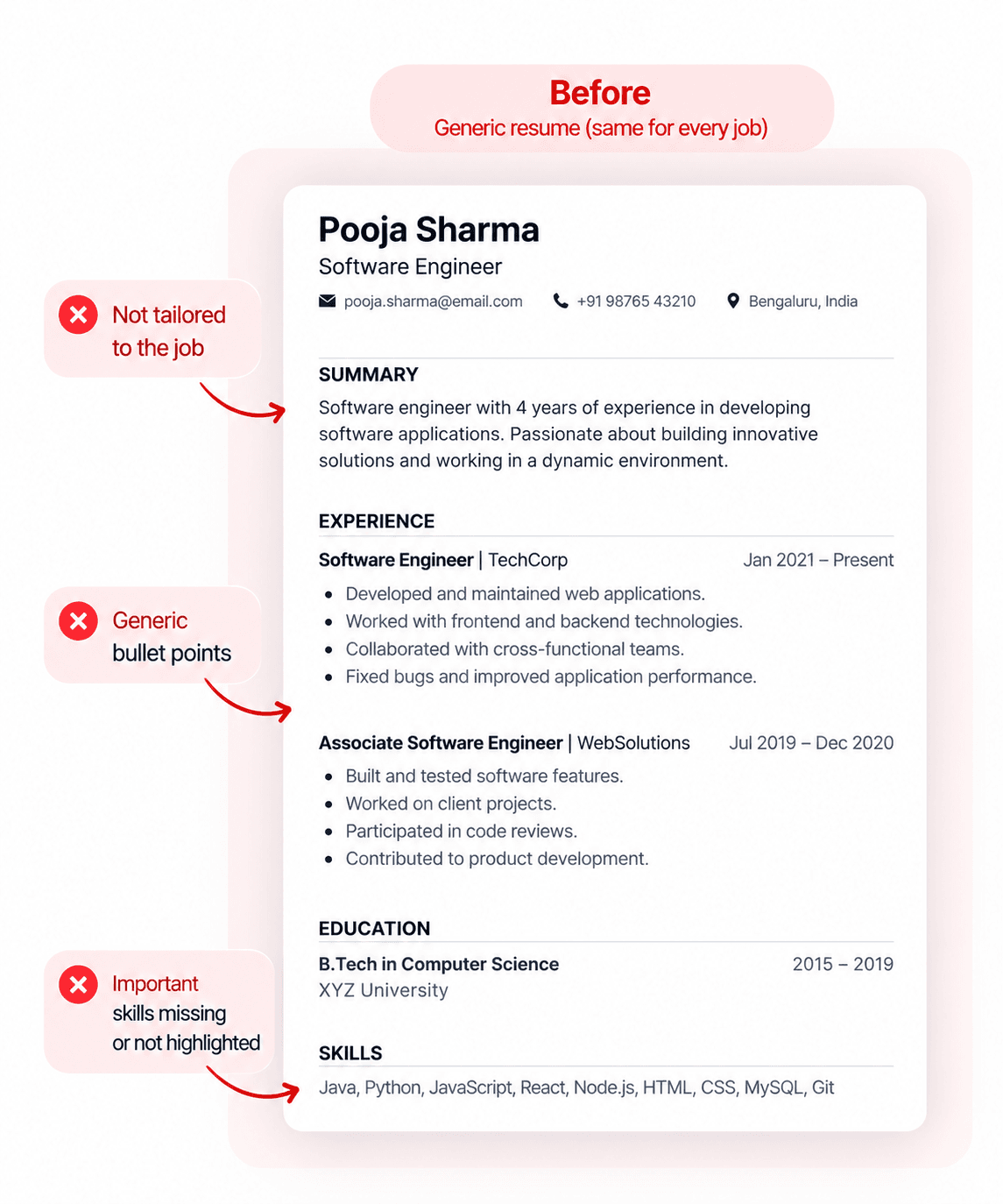
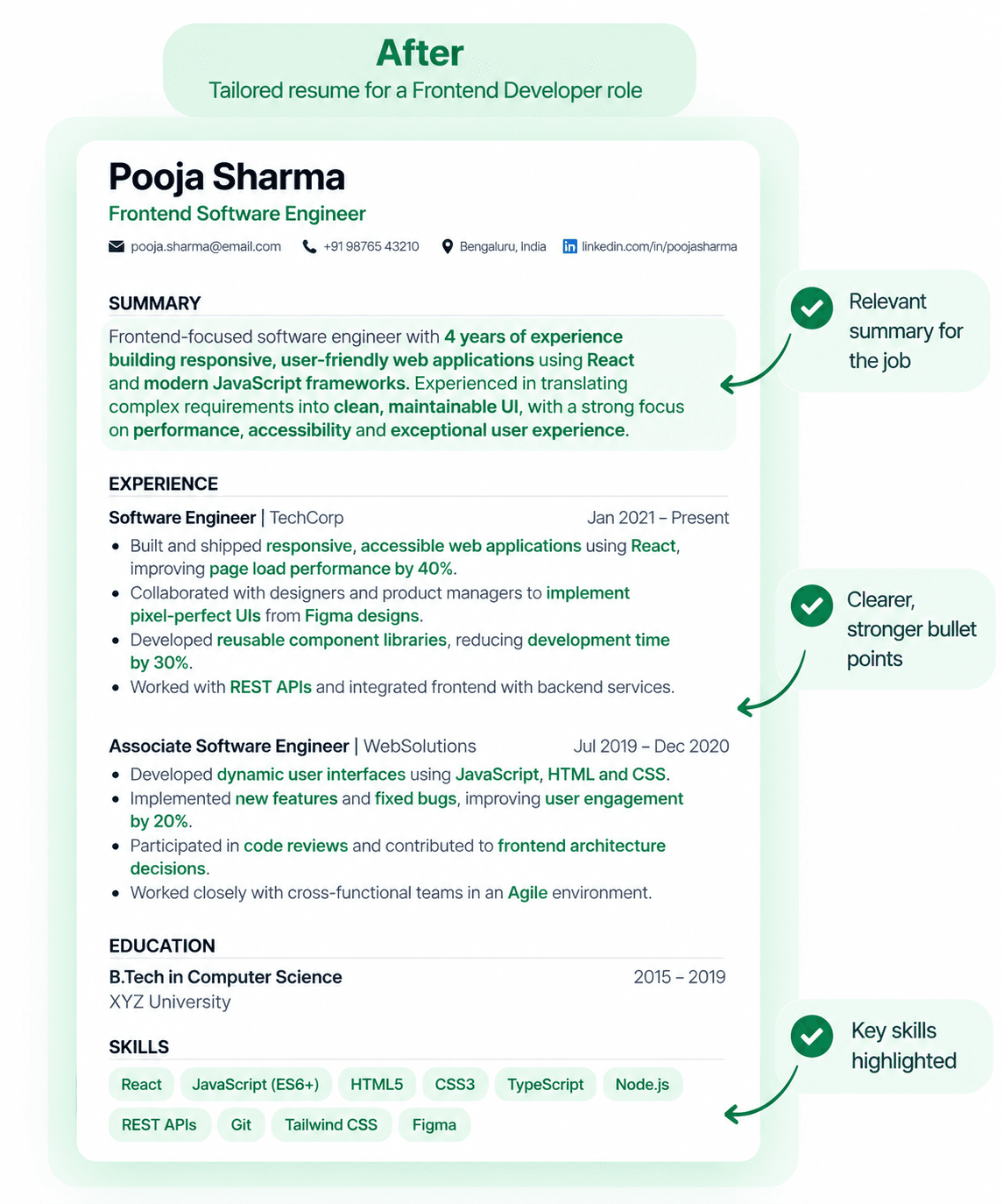
See the Difference: Before and After
Same experience. Different resume — here is what changes when you tailor for the role.
How it works
How SynCV Works
One upload, then two clicks per application.
Upload your resume once
PDF or Word. SynCV parses it into structured sections — experience, skills, education — and keeps it as your base resume. You never upload it again, and it stays unchanged no matter how many jobs you apply to.
Paste the job description
The full posting. SynCV pulls out the requirements it repeats, the tools it names and the vocabulary the team uses, then compares them against what your resume already says.
Review, edit and export
You get a resume aimed at that posting, with a breakdown of which requirements it addresses and which it doesn't. Change any line before you download it — nothing is sent anywhere on your behalf.
1 free scan, no card required. More detail on how resume tailoring works.
Why it matters
Why Tailor Your Resume for Every Job?
Because the resume that describes your whole career is rarely the one that answers a specific posting. Tailoring decides what a reviewer sees first — it does not change what you have done.
A generic resume is aimed at the average job
No employer is hiring for the average. The broader your experience, the more a one-size resume has to bury — three specialisms compressed into one document means two of them are invisible on any given application.
Screeners read the top third of page one
Resume screening is a scan, not a read. Whatever answers this employer's requirements has to be above the fold, not on page two under a role from four years ago.
Matching systems compare your words to theirs
Most applicant tracking systems rank applicants by overlap with the posting. Describing the same work in the employer's vocabulary moves you up that ranking — no tool can promise it passes you through.
Nothing about your history changes
Tailoring redistributes attention. Same roles, same dates, same achievements — a different decision about which ones lead.
More on the method: how to tailor your resume to a job description and whether to tailor for every job.
Features
Tailor. Don't Fabricate.
Every change comes from the resume you already have.
Fast Resume Scans
Upload your resume and get clear, actionable feedback in minutes so you can apply quickly with confidence.
Rapid Resume Improvements
Improve bullets, summaries, and skills alignment in a few clicks and save hours of manual editing.
One-Click Resume & Cover Letter Builder
Paste a job description and generate a targeted resume and cover letter instantly, ready to download and send.
Smart Match Breakdown
See match score, keyword coverage, and section-level insights at a glance to fix weak spots faster.
Seamless Job Tracking
Track all your applications in one place and stay on top of interviews, follow-ups, and next steps.
Quick Job Description Analysis
Break down any job description in seconds and focus your resume on what each role actually needs.
More tools
More Tools for Your Job Search
Tailoring is the core of it. These are the parts around it.
Tailor your resume to a job description
Upload your resume once, paste a job description, and SynCV rewrites it for that job using the experience you already have. Tailor, don't fabricate.
Check your resume against the job you're applying to
See how closely your resume matches a specific job description, which requirements it misses, and whether its formatting will parse cleanly in an ATS.
Work out what a job description is really asking for
Break a job posting down into the requirements that actually matter, the keywords it screens on, and the parts of your experience worth leading with.
Generate a cover letter from your actual resume
A cover letter drafted from the experience on your resume and the requirements in the posting — specific enough to be worth reading, and true enough to defend.
Track applications alongside the resume you sent
Keep every application, the tailored resume you sent, and its match score in one place — so you know which version went where when the call comes.
Tailoring advice by role
What reviewers in a specific discipline look for first, and what to lead with.
Pricing
Start Free. Upgrade When You're Ready.
Every account starts with 1 free scan and no card. Pick a plan when you're applying every week.
Free
Try every feature with 1 free scan. No card required.
Start for free- 1 resume scan in total
- Resume generation
- Cover letter generation
- No job tracking (Trial only)
- No weekly scan refill
- No access to remote jobs listing
Pro
Everything SynCV does, with unlimited scans.
Get Pro- Unlimited Resume Scans
- Unlimited Resume Optimizations
- Unlimited Cover Letters
- Unlimited Resume/Cover Letter Downloads
- Full Remote Jobs Board
- One Click Analysis & Optimization
- Tailored Resume for Every Job
- Create Resume from Scratch
- Keyword Gap Analysis and Matching
- ATS-friendly Resume Templates
- Automated Job Tracker
Fair use: up to 50 optimizations a day. After 10 optimizations in an hour, optimizing pauses for an hour. Up to 200 scans a day, 30 scans per hour.
FAQ
Frequently Asked Questions
What people ask before they trust a tool with their resume.
What is job-specific resume tailoring?
- Job-specific resume tailoring reads your resume and a job description together, works out which of your existing experience matters most for that role, and rewrites the resume to lead with it. SynCV does this in two clicks: upload your resume once, paste a job description, and get a version aimed at that posting.
Does SynCV invent experience or skills?
- No. SynCV only works with what is already on your resume. It reorders sections, rewrites bullet points and changes emphasis so your real experience reads as relevant to a specific job. It will not add a technology you have never used or a job you have never held — that is the difference between tailoring and fabricating, and it is a line the product does not cross.
Can I tailor the same resume to multiple jobs?
- Yes, and that is the intended workflow. You keep one base resume in SynCV and generate a separate tailored version for each job description you apply to. Your base resume stays untouched, so every new application starts from the same complete record of your experience.
How is resume tailoring different from resume rewriting?
- Rewriting changes how your whole resume reads, once, for every application. Tailoring changes which parts of it are prominent, each time you apply. A rewrite improves the document; tailoring aims it at one posting. SynCV does the second, which is why you run it per job rather than once.
Does tailoring a resume help with ATS?
- It helps, because most applicant tracking systems rank or filter on how closely a resume's wording matches the job description. If you describe the same work in the words the posting uses, you score better on that comparison. No tool can guarantee an ATS will pass you through, and SynCV does not claim to — a recruiter still reads the result.
Can I edit the tailored resume before downloading it?
- Yes. Every tailored resume opens in an editor where you can change any line, then re-check the match score before downloading. Nothing is sent anywhere on your behalf — you review and export the file yourself.
Can I use SynCV if I am changing careers?
- Yes, and that is where tailoring does the most work. SynCV surfaces the transferable parts of your current experience in the vocabulary of the role you are targeting. It cannot give you experience you do not have, so a career change still depends on you having genuinely relevant work to point at.
How many free scans do I get?
- Every account includes 1 free resume scan to start, with no card required; it does not refill. Pro has no scan limit, whether you pay weekly, monthly or quarterly — only fair-use ceilings of 30 scans an hour and 200 a day.
What payment methods do you accept?
- Payments are processed by Dodo Payments, our merchant of record. The checkout page shows the payment methods available where you are.
Do you offer refunds?
- We do not offer refunds. Every account gets 1 free scan before any payment so you can judge the output first, and support will help with anything that does not work as described.
Get started
Ready to Start Applying Faster?
Turn each job post into a polished, ready-to-send application in minutes.